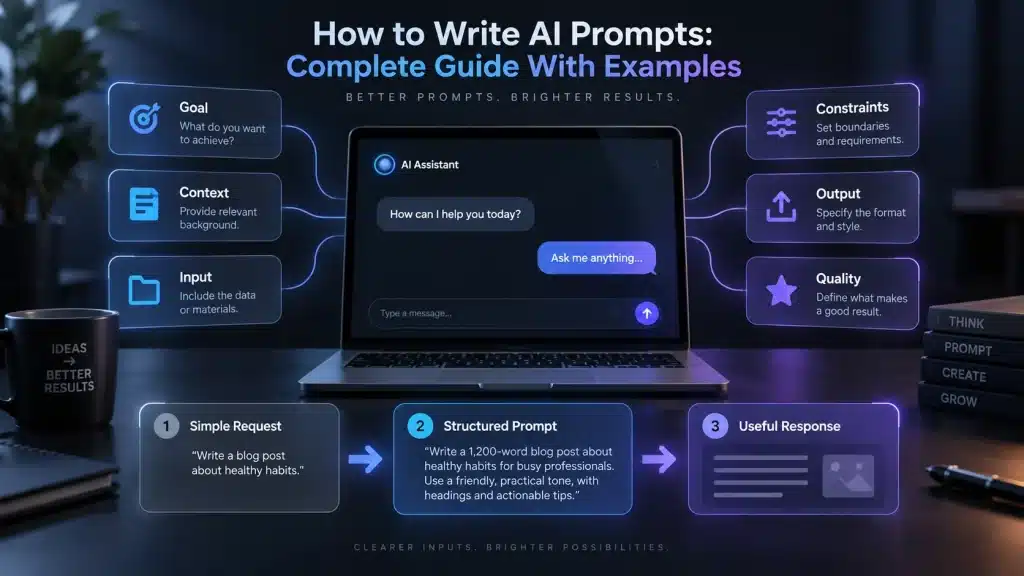
Learning how to write AI prompts is one of the simplest ways to get more useful results from tools such as ChatGPT, Claude, Gemini and other AI assistants.
A weak prompt might produce a generic answer, misunderstand your goal or give you far more information than you need. A well-designed prompt can specify the task, provide the right context, define important constraints and tell the AI exactly what a useful result should look like.
But effective prompting in 2026 is different from the early days of generative AI.
You usually do not need mysterious “magic words,” unnecessarily complicated prompt formulas or pages of instructions. Modern AI models have become substantially better at understanding natural language and following complex requests. Current guidance from OpenAI emphasizes clear goals, context, outcome requirements and iterative refinement; Anthropic similarly recommends direct instructions, useful context and examples where they help; Google’s Gemini documentation recommends precise instructions, constraints, structured prompts and appropriate examples.
The most useful principle is simple:
Tell the AI what you want, give it what it needs to do the job, define what a successful answer looks like, and then improve the request based on the result.
This guide explains how to write AI prompts step by step, with practical examples for writing, research, coding, business, studying, data analysis, SEO, document analysis and AI image generation.
Last reviewed: September 2026
Editorial note: AI models change quickly. A prompt that works extremely well with one model may behave differently with another. Treat the techniques in this guide as strong starting points, then test them with the model and task you actually use.
In this guide
- What an AI prompt is
- The six parts of a strong prompt
- How to write prompts step by step
- Prompts for research
- Prompts for content writing
- Prompts for coding
- Prompts for image generation
- Common prompting mistakes
- Reusable prompt template
- Prompt security and privacy
- Practice with Unlimited AI
- Frequently asked questions
What Is an AI Prompt?
An AI prompt is the information or instruction you give an artificial intelligence system to tell it what you want.
A prompt can be as simple as:
Explain photosynthesis.Or it can contain detailed instructions, source material, examples and formatting requirements:
Explain photosynthesis to a 12-year-old student.

Use simple language and one everyday analogy.

Cover:
- what plants take in
- what they produce
- why sunlight matters

Keep the explanation under 250 words and finish with three quiz questions.
Prompts are not limited to text.
Depending on the AI system, a prompt can also include images, audio, video, PDFs, spreadsheets, webpages, code or other files. OpenAI’s current prompting material, for example, defines prompts broadly enough to include text, images, audio and shared files.
If you are new to AI assistants more generally, our Conversational AI guide explains how modern conversational systems process natural-language interactions.
What Is Prompt Engineering?
Prompt engineering is the process of designing, testing and refining instructions so an AI model produces more useful and reliable results.
The term can make prompting sound more technical than it needs to be.
For everyday users, prompt engineering often means improving questions such as:
Write an email.into something like:
Write a short professional email to a customer whose order will arrive three days late.

Apologize without sounding defensive.

Explain that the shipment is already in transit.

Do not offer a refund because I am not authorized to make that decision.

Keep the email under 120 words.
The second prompt gives the model enough information to make useful decisions.
OpenAI’s current guidance describes prompt engineering as designing and optimizing inputs to guide model responses and recommends clear, specific requests followed by iterative refinement when necessary.
Why Learning How to Write AI Prompts Still Matters in 2026
Modern models understand natural language considerably better than earlier generations, so prompt engineering is becoming less about tricking the model and more about communicating the actual task clearly.
OpenAI’s recent model guidance increasingly favors outcome-oriented prompting: describe the desired result, success criteria, important constraints, available evidence and required output rather than micromanaging every reasoning step.
Anthropic makes a similar point. Its current Claude prompting documentation says to be clear and direct, provide context and specify the desired output and constraints. Anthropic even suggests a practical test: if a colleague with little background information would be confused by your instruction, the AI probably lacks enough context too.
Google’s current Gemini guidance likewise recommends precise instructions, explicit constraints, clear output requirements and consistent prompt structure.
This means one of the best ways to improve an AI response is often not adding more words.
It is removing ambiguity.
The Six Parts of a Strong AI Prompt
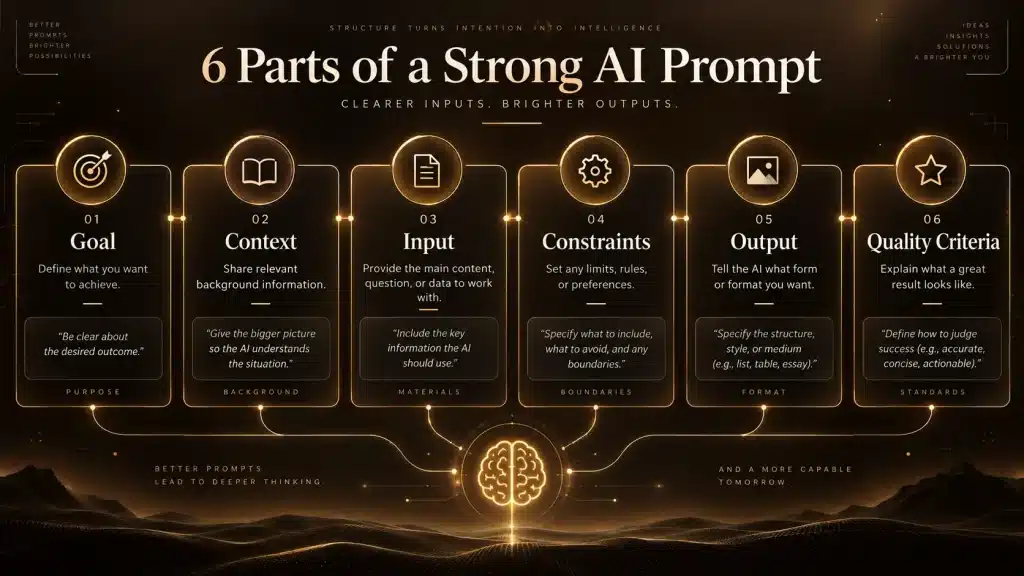
There is no universal prompt formula that works perfectly for every model and task.
However, most effective prompts contain some combination of six useful elements:
| Prompt element | Question it answers | Example |
|---|---|---|
| Goal | What should the AI accomplish? | Compare three laptops |
| Context | What background does it need? | I am buying one for university |
| Input | What material should it work from? | These three specifications |
| Constraints | What limits must it follow? | Under $1,000; battery matters most |
| Output | How should the result be presented? | Comparison table + recommendation |
| Quality criteria | What makes the answer successful? | Explain tradeoffs and flag uncertain data |
You do not need every element in every prompt.
For a basic question, this may be enough:
Explain compound interest to a beginner using a simple numerical example.For a complicated task, the fuller structure becomes valuable.
For example:
Goal:
Compare these three project-management tools and recommend the best one for our team.

Context:
We are a 12-person remote software company. Most employees are non-technical.

Priorities:
Ease of use is most important, followed by integrations and price.

Evidence:
Use the pricing and feature information I provide below. Do not assume missing features.

Output:
Create a comparison table first, followed by a recommendation of no more than 300 words.

Quality requirement:
Clearly identify any information that cannot be confirmed from the supplied evidence.
That prompt does much more than simply say:
Which project management tool is best?How to Write AI Prompts Step by Step
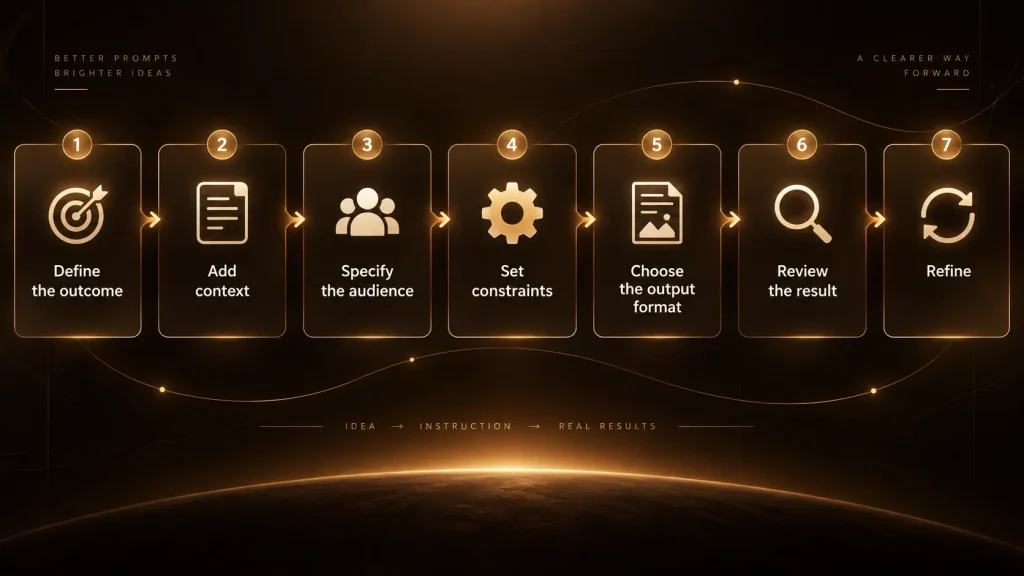
The easiest way to learn how to write AI prompts is to start with the desired outcome.
Suppose you want an article.
The weak version is:
Write an article about cybersecurity.The AI has to guess almost everything:
Who is reading it?
What part of cybersecurity matters?
How long should it be?
Should it be technical?
Should it contain sources?
Is the article for beginners or security professionals?
What is its purpose?
A much stronger version is:
Write a 1,500-word beginner-friendly guide explaining how small businesses can improve basic cybersecurity.

Audience:
Small-business owners with little technical knowledge.

Cover:
password security, multi-factor authentication, backups, software updates, phishing and employee training.

Tone:
Professional, practical and easy to understand.

Evidence:
Use current guidance from recognized cybersecurity authorities. Distinguish official recommendations from your own explanation.

Output:
Use a clear title, H2 sections and a short FAQ.

Avoid:
fear-based language, unsupported statistics and claims that a security measure guarantees protection.
The task is now much harder to misunderstand.
Start With the Outcome, Not a Vague Topic
One of the biggest prompting mistakes is giving the AI a subject without explaining what you want done with it.
Consider:
Electric vehiclesThe AI cannot know whether you want:
a definition, buying guide, market forecast, technical explanation, school essay, social post, business analysis or debate.
A stronger prompt states an action:
Explain the main advantages and disadvantages of electric vehicles for someone deciding whether to buy one in 2026.Better again:
Compare the practical advantages and disadvantages of electric vehicles and hybrid vehicles for a driver who travels about 15,000 km per year.

Focus on:
purchase cost, energy cost, charging, maintenance, long-distance travel and resale considerations.

Do not assume electricity or fuel prices; tell me which local figures I should provide for an accurate cost comparison.

Finish with the situations in which each option makes more sense.
The subject remains the same.
The goal becomes much clearer.
Give the AI Relevant Context
Context helps an AI understand why you are asking and which answer is useful.
Anthropic explicitly recommends providing context or motivation because it helps the model understand the purpose behind an instruction. Google also recommends supplying contextual information rather than assuming the model already has everything required to solve the task.
Compare:
Create a meal plan.with:
Create a simple seven-day dinner plan for two adults.

We cook at home, have about 30 minutes on weekdays, prefer inexpensive ingredients and want to reuse ingredients across meals to reduce waste.

Do not include breakfast or lunch.
Context changes the answer dramatically.
The same principle applies to coding:
Fix this PHP code.is weaker than:
This code runs inside a WordPress plugin on PHP 8.3.

Identify the cause of the fatal error and make the smallest safe change required to fix it.

Do not redesign unrelated functions.

Explain the problem first, then provide the corrected code.
For more examples specifically related to programming, see our Best AI for Coding guide.
Tell the AI Who the Audience Is
Audience is often one of the highest-value pieces of context.
Compare:
Explain inflation.with:
Explain inflation to a 10-year-old using an everyday example involving the price of food.or:
Explain inflation to a first-year economics student. Include demand-pull inflation, cost-push inflation and the role of inflation expectations.or:
Write a 150-word explanation of inflation for small-business owners deciding whether to increase prices.The factual topic is the same.
The useful response is completely different.
Specify Constraints That Actually Matter
Constraints reduce the AI’s decision space.
Useful constraints include length, budget, technology, geography, timeframe, reading level, prohibited assumptions and required evidence.
For example:
Recommend a laptop.becomes:
Recommend a laptop for university work.

Maximum budget: $900.
Main tasks: web research, Microsoft Office, video calls and light Photoshop.
Priorities: battery life and low weight.
Not needed: gaming performance.
Only recommend currently available models and verify current prices before comparing them.
The important principle is to specify real constraints, not fill the prompt with arbitrary rules.
Modern models can actually perform worse when overloaded with conflicting or unnecessary instructions. OpenAI’s current model guidance specifically recommends removing legacy prompt complexity where it adds noise and defining the desired outcome instead.
Tell the AI What the Output Should Look Like
Do not assume the model knows your preferred format.
If you need a table, say table.
If you need a short answer, specify a limit.
If you need JSON, define the schema or use the product’s structured-output feature where available.
If you need WordPress headings, say so.
Compare:
Compare ChatGPT, Claude and Gemini.with:
Compare ChatGPT, Claude and Gemini for research.

Start with a table containing:
Tool
Best use case
Main strength
Main limitation

Then write one short paragraph for each tool.

Finish with recommendations for:
general web research
academic research
document analysis

Do not declare a universal winner unless the evidence supports it.
Google’s prompting documentation explicitly recommends telling the model the desired response format, such as a table, list or paragraph. OpenAI likewise recommends being specific about length, format, style and outcome.
Show the AI an Example When Format Matters
Sometimes explaining what you want is harder than showing it.
This is known as few-shot prompting.
Suppose you need product titles converted into a very specific format.
Instead of only describing the rule, provide examples:
Convert each product title into this format:

Brand | Product | Key Feature

Examples:

Input:
Apple MacBook Air M4 16GB 512GB Midnight

Output:
Apple | MacBook Air M4 | 16GB RAM, 512GB SSD, Midnight

Input:
Sony WH-1000XM6 Wireless Noise Cancelling Headphones Black

Output:
Sony | WH-1000XM6 | Wireless Noise Cancelling, Black

Now convert:
[YOUR PRODUCTS]
Examples are especially useful for classification, formatting, tone and repeated workflows.
Anthropic calls examples one of the most reliable ways to steer format, tone and structure and recommends relevant, diverse examples. Google likewise recommends few-shot examples for controlling patterns and output behavior.
You do not need examples for every simple prompt.
Use them when the desired pattern is difficult to describe or the AI repeatedly gets it wrong.
Use Delimiters for Long or Complicated Prompts
When a prompt contains instructions, source material, examples and output requirements, clearly separating them can reduce confusion.
Markdown headings work well:
# Task
Summarize the customer complaints below.

# Context
These complaints were submitted during August 2026.

# Rules
Group complaints by root cause.
Do not invent causes that are not supported by the complaints.
Quote only short phrases when useful.

# Customer Complaints
[PASTE COMPLAINTS HERE]

# Output
Return:
1. Main complaint categories
2. Approximate number in each category
3. Repeated themes
4. Problems that need manual investigation
XML-style tags are another option:
<task>
Compare the two proposals.
</task>

<proposal_a>
...
</proposal_a>

<proposal_b>
...
</proposal_b>

<output>
Identify agreements, disagreements, costs and unresolved questions.
</output>
OpenAI recommends clear separators such as Markdown headings or delimiters in complex prompts, while Anthropic specifically recommends XML tags when prompts mix instructions, context, examples and variable inputs. Google supports both Markdown and XML-style structure for complex Gemini prompts.
Ask for Evidence When Facts Matter
If the answer depends on current or verifiable facts, the prompt should say so.
Do not merely write:
Tell me the best smartphones.Try:
Compare five currently available smartphones under $700.

Research current specifications and prices rather than relying only on model memory.

Prefer manufacturer specifications for hardware facts and reputable independent reviewers for battery, camera and real-world performance.

Include source links for factual claims that could have changed.

If sources disagree, explain the disagreement rather than choosing one silently.
This is particularly important for research.
A strong research prompt defines the evidence standard.
For example:
Research whether remote work improves employee productivity.

Prioritize:
peer-reviewed research
large-scale studies
recognized academic institutions

Separate:
research findings
company surveys
individual opinions

For each major claim, provide the original source.

Identify contradictory evidence and limitations rather than producing only evidence supporting one conclusion.
If research is a major part of your workflow, our Best AI for Research comparison covers dedicated research systems and source-verification strategies.
Do Not Assume “Give Me Sources” Guarantees Accurate Citations
A common prompting mistake is believing this instruction solves factual reliability:
Give me sources.It does not.
A model can provide a real source that does not fully support the claim, misunderstand a paper, use outdated evidence or—in systems without live retrieval—even produce a reference incorrectly.
A better prompt is:
Use current web research for claims that could have changed.

Prioritize primary sources.

For each important factual statement, cite the exact source that supports it.

Do not cite a source unless you have actually inspected it.

If a source supports only part of a claim, narrow the claim.

Clearly identify any conclusion that is an inference rather than something directly stated by a source.
Then open the important sources yourself.
AI should assist verification, not replace it.
How to Write AI Prompts for Research
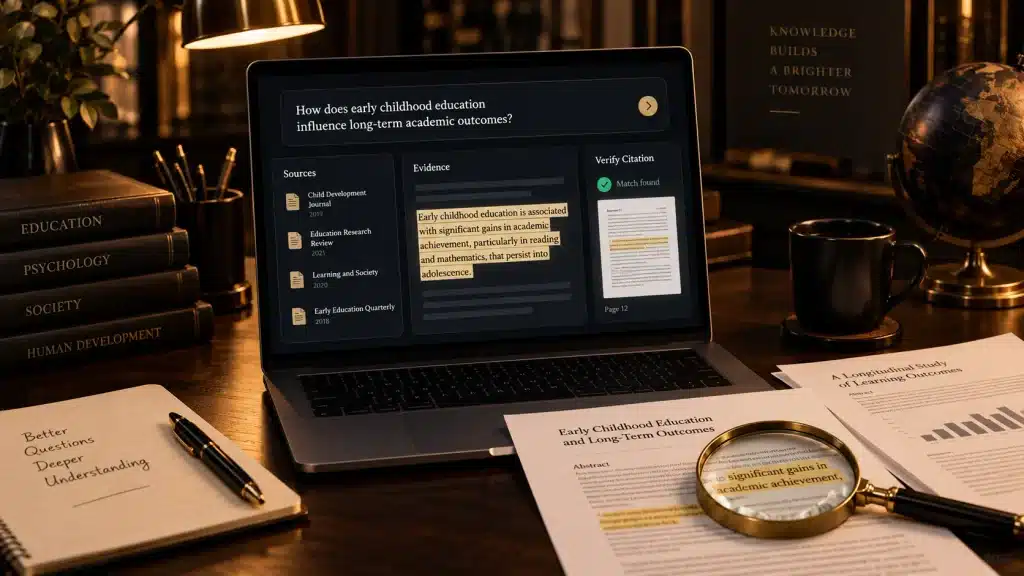
A poor research prompt:
Research AI in education.A much stronger prompt:
Research how generative AI is being used in university education in 2026.

Scope:
Focus on teaching, student learning, assessment and academic integrity.

Evidence:
Prioritize peer-reviewed studies, universities, government education bodies and major educational organizations.

Exclude:
SEO blogs that simply summarize other articles unless they add original evidence.

Tasks:
Identify major documented benefits.
Identify major documented risks.
Find evidence that challenges optimistic claims.
Explain where research remains inconclusive.

Output:
Start with a 150-word executive summary.
Then organize findings by theme.
Cite the original source for important factual claims.
Finish with five unanswered research questions.
That prompt gives the AI both a research problem and a research methodology.
How to Write AI Prompts for Content Writing

A weak writing prompt:
Write a blog post about AI.A better prompt:
Write a beginner-friendly article explaining what multimodal AI is.

Audience:
People who use AI tools but do not have a technical background.

Search intent:
The reader wants to understand what multimodal AI means, how it differs from text-only AI and where it is used.

Cover:
text, images, audio and video
how multimodal inputs work at a high level
real-world examples
benefits
limitations
privacy considerations

Tone:
Professional, clear and educational.

Avoid:
unverified statistics
marketing hype
keyword stuffing
claims that AI understands information exactly like a human

Use descriptive H2 and H3 headings and finish with a concise FAQ.
If writing for search, the prompt should help produce content for readers rather than manipulate rankings.
Google says its systems aim to prioritize helpful, reliable, people-first information. It specifically warns that using generative AI to create many low-value pages for ranking manipulation can violate its scaled-content-abuse policy.
That means this is a poor SEO prompt:
Write 100 articles targeting every variation of this keyword so I rank on Google.A healthier prompt is:
Help me create the most useful single guide for someone searching this topic.

Identify the main questions a genuine reader needs answered.

Avoid creating separate sections merely to repeat keyword variations.

Suggest places where original screenshots, tests or first-hand examples would make the article more useful.
Google’s 2026 guidance for generative-AI search likewise emphasizes unique, non-commodity material rather than manufacturing pages for every search variation.
How to Write AI Prompts for SEO
AI can help with SEO, but you should use it to improve useful content rather than mechanically manufacture search pages.
For example:
Analyze this draft for the search intent "how to write AI prompts."

Do not rewrite the article yet.

Identify:
topics a beginner would expect but that are missing
sections that repeat the same idea
claims that require authoritative sources
headings that are vague
internal-link opportunities
places where original examples would add value

Do not recommend keyword repetition merely to increase keyword density.

Base SEO recommendations on usefulness and clarity rather than a fixed keyword-density percentage.
Another useful prompt:
Generate five SEO title options for this article.

Primary topic:
how to write AI prompts

Requirements:
Describe the page accurately.
Keep the wording natural.
Do not use clickbait.
Do not promise guaranteed results.
Keep the important topic near the beginning where practical.

Article:
[PASTE ARTICLE]
Google’s Search Essentials recommend using words people actually use to find content in prominent locations such as titles, main headings, link text and alt text, while still creating content primarily for users.
How to Write AI Prompts for Coding
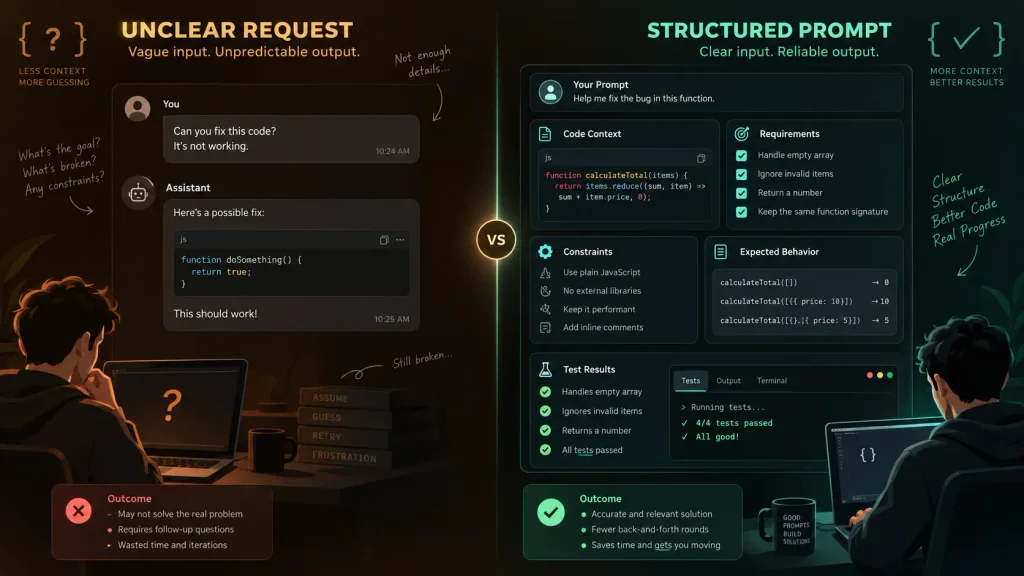
A weak coding prompt:
My JavaScript doesn't work. Fix it.A better one:
Debug the JavaScript function below.

Expected behavior:
Remove duplicate objects based on the `id` property while preserving the first occurrence.

Actual behavior:
Some duplicates remain.

Requirements:
Identify the root cause before changing anything.
Make the smallest safe fix.
Do not introduce external libraries.
Preserve the existing function signature.
Add three test cases, including one edge case.

Code:
```javascript
[PASTE CODE]
A prompt for reviewing AI-generated code could be:
```text
Review this code as if it will be deployed to production.
Check for:
correctness
security problems
unhandled edge cases
unnecessary complexity
performance issues
Do not rewrite the entire implementation unless necessary.
For every proposed change, explain:
the issue
its practical impact
the smallest reasonable fix
Code:
[PASTE CODE]For larger development projects, a repository-aware coding agent may be more useful than a normal chat interface. See our Best AI for Coding comparison for that distinction.
How to Write AI Prompts for Business
Business prompts become more useful when the model understands the decision, audience and authority boundaries.
Instead of:
Reply to customer.try:
Draft a customer-support email.

Situation:
The customer's package is four days late and they are angry.

Confirmed information:
The package is currently in transit.
The carrier has not provided a new delivery date.

Authority:
I can apologize and offer tracking help.
I cannot issue refunds or promise delivery dates.

Tone:
Calm, respectful and human.

Length:
80–130 words.

Do not blame the courier or invent a delivery estimate.
For a business analysis:
Analyze the following monthly customer-support data.

Goal:
Identify problems management should prioritize next month.

Separate:
high-volume issues
high-severity issues
issues increasing fastest
issues that may be caused by the same root problem

Do not treat correlation as proof of causation.

Finish with three recommended investigations, not unsupported conclusions.

Data:
[PASTE DATA]
If you are building broader business workflows around AI, see our guide to using an AI chatbot for business.
How to Write AI Prompts for Emails
Useful email prompts specify the relationship, purpose and tone.
For example:
Rewrite this email to sound professional and polite.

Relationship:
I am writing to a supplier we have worked with for three years.

Goal:
Ask why the delivery is late and request a confirmed shipping date.

Tone:
Firm but not aggressive.

Keep all factual details from my original message.
Do not invent order numbers or dates.

Maximum length:
150 words.

Original email:
[PASTE EMAIL]
You can also request alternatives:
Give me three versions:
1. formal
2. warm and professional
3. very concise

Keep the meaning identical.
How to Write AI Prompts for Summarization
The instruction:
Summarize this.is sometimes enough.
For serious documents, define what information matters:
Summarize the report below for a company director who has not read it.

Focus on:
financial changes
major risks
deadlines
decisions that require management action

Ignore:
background information that does not affect a decision.

For every number in the summary, preserve the original units and dates.

If an important point is ambiguous in the source, label it as ambiguous rather than resolving it yourself.

Finish with:
"Actions requiring attention"

Report:
[PASTE REPORT]
This reduces the chance of getting a generic summary that emphasizes information you do not care about.
How to Write AI Prompts for Long Documents
Long-context prompting deserves special treatment.
If you paste a large contract, report or collection of research papers, clearly separate the source from your instructions.
For example:
<documents>

<document id="1" title="2026 Annual Report">
[DOCUMENT]
</document>

<document id="2" title="Competitor Report">
[DOCUMENT]
</document>

</documents>

<task>
Compare the two documents.

Identify:
areas of agreement
contradictory numbers
different strategic priorities
major risks mentioned by only one source

For every important conclusion, identify which document supports it.

Do not introduce information that is absent from both documents.
</task>
Anthropic’s current guidance for long-context prompts recommends placing large documents prominently and clearly separating documents and metadata; it also reports improved performance in its testing when the actual query follows large source material.
The exact optimal placement can differ across models, so treat this as model-specific guidance rather than a universal law.
How to Write AI Prompts for Studying and Learning
Do not use AI only to give you answers.
You can prompt it to make you actively think.
For example:
Teach me the basics of supply and demand.

Assume I understand basic arithmetic but have never studied economics.

Do not give me a long lecture all at once.

Teach one concept, give me a short example, then ask me one question to check whether I understand.

If my answer is wrong, explain the mistake without immediately giving the final answer.

Gradually increase the difficulty.
For exam preparation:
Create a 20-minute practice session using the notes below.

Start with five short recall questions.

Then give me three application questions.

Do not reveal answers until I respond.

At the end, identify the topics I struggled with and create five follow-up questions only on those areas.

Notes:
[PASTE NOTES]
This turns the AI into a tutor rather than an answer generator.
How to Write AI Prompts for Data Analysis
Data analysis prompts should distinguish observations from conclusions.
For example:
Analyze this sales dataset.

First check:
missing values
duplicate rows
obvious formatting problems
outliers that may indicate data errors

Then calculate:
monthly revenue
month-over-month change
average order value
top five product categories by revenue

When interpreting the results:
separate calculations from hypotheses
do not claim causation from correlation
identify limitations in the dataset

Output:
1. data-quality findings
2. calculated metrics
3. notable patterns
4. questions requiring more data

Dataset:
[UPLOAD FILE]
When calculations matter, tools that can actually execute code are generally preferable to asking a language model to mentally calculate everything. Google’s current Gemini prompting guidance similarly recommends using code execution for calculations when available.
How to Write AI Prompts for Image Generation
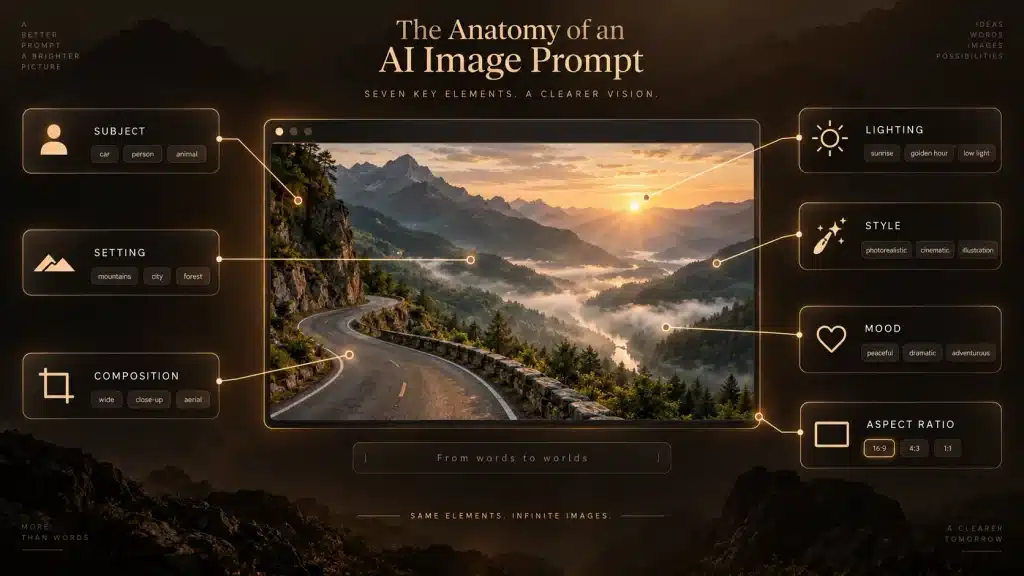
Image prompts benefit from describing the visual result rather than writing an essay about it.
A useful structure is:
subject + environment + composition + lighting + visual style + important constraints
For example:
A realistic Bengal cat sitting on a wooden windowsill inside a modern apartment, full body visible, exactly four legs with natural anatomy, looking toward rain outside the window, soft afternoon window light, shallow depth of field, professional photography, 16:9 landscape composition, no text, no logo, no watermark.For a website illustration:
Professional cybersecurity illustration for a business article, laptop displaying abstract source code, security shield and verification checkmark, modern dark office environment, clean minimal composition, subtle dramatic lighting, premium commercial technology style, wide 16:9 landscape, no readable text, no company logos, no watermark.Avoid relying on long negative lists when a clear positive description can specify the desired composition.
For example, instead of only saying:
Don't show extra people, don't show cars, don't show buildings.say:
A single person standing alone in an open grassy field, full-body composition, empty landscape around the subject.How to Write AI Prompts for Brainstorming
A weak brainstorming request:
Give me business ideas.will usually produce familiar ideas.
Define the problem and evaluation criteria:
Generate 15 small online-business ideas.

Constraints:
startup budget under $1,000
one person can launch the first version
no physical inventory
target customers should have a recurring problem
avoid generic dropshipping, affiliate blogs and print-on-demand

For each idea, explain:
target customer
problem
possible product
why customers might pay
biggest risk

Do not rank them yet.
Then continue:
Now eliminate ideas that depend heavily on paid advertising.

Score the remaining ideas from 1–5 for:
ease of validation
competition
recurring revenue potential
technical difficulty

Explain every score.
Prompting works particularly well as a conversation.
You do not need to put everything into the first message.
How to Ask AI to Improve Its Own Answer
One of the most useful follow-up prompts is simply:
Review your previous answer against my original requirements.

Identify anything that:
was missed
was unsupported
was unclear
contradicted another part of the answer

Then produce a corrected version.
For research:
Challenge your previous conclusion.

Find the strongest evidence or reasoning that could make the conclusion wrong.

If the evidence changes your conclusion, revise it.
For writing:
Edit the article for repetition.

Do not shorten sections merely because they are long.

Remove only sentences that repeat information already explained equally well elsewhere.
Iteration is explicitly recommended by OpenAI and Google rather than treating the first prompt as something that must be perfect.
Should You Tell AI to “Act as an Expert”?
Role prompting can be useful, but it is often misunderstood.
This:
Act as the world's best marketing genius.does not magically make a model more accurate.
A more useful role is specific:
You are editing this document from the perspective of a B2B SaaS content editor.

Focus on:
clarity
unsupported claims
repetition
technical explanations that a non-specialist will struggle to understand

Do not change factual claims unless you can explain why they are inaccurate.
The role helps define the perspective and standards.
Anthropic’s current guidance supports using roles to focus model behavior, while modern OpenAI guidance increasingly emphasizes the outcome and success criteria rather than elaborate personas.
Should You Say “Think Step by Step”?
You will still see old prompt guides recommending:
Think step by step.That advice is no longer universally appropriate.
Different model families reason differently.
Modern reasoning models often perform substantial reasoning internally and increasingly benefit from straightforward, outcome-focused instructions rather than being forced through a human-designed reasoning procedure. OpenAI’s current model guidance recommends describing the expected outcome and allowing capable models to choose an efficient path unless a particular process is genuinely required. Anthropic similarly says general reasoning instructions can be preferable to prescriptive hand-written reasoning steps for its latest models.
For most everyday prompts, instead of requesting the model’s private reasoning process, ask for something useful and verifiable:
Check the answer carefully before responding.

Show the calculations needed to verify the result.

State the assumptions you used.

Explain the final conclusion concisely.
That gives you evidence you can inspect without requiring a long internal reasoning transcript.
Zero-Shot vs Few-Shot Prompting
A zero-shot prompt gives the instruction without demonstrating examples:
Classify this customer message as:
Billing
Technical
Shipping
Other

Message:
"My order still hasn't arrived."
A few-shot prompt demonstrates the desired pattern first:
Message:
"My credit card was charged twice."
Category:
Billing

Message:
"The application crashes when I upload a PDF."
Category:
Technical

Message:
"The tracking hasn't changed for six days."
Category:
Shipping

Now classify:

Message:
"My package was supposed to arrive yesterday."
Category:
Few-shot prompting becomes useful when consistency matters.
Google recommends specific and varied examples for tasks where examples help the model understand the pattern. Anthropic similarly recommends relevant and diverse examples for format and behavior control.
Tell the AI What to Do, Not Only What Not to Do
Consider:
Don't be too long.
Don't sound robotic.
Don't use difficult words.
Don't repeat yourself.
The AI knows many things to avoid but has a less precise description of the desired result.
Try:
Write 250–300 words in natural conversational English for a general audience.

Use ordinary vocabulary, varied sentence lengths and concise paragraphs.

Explain each idea once, clearly.
Anthropic explicitly recommends positive instructions where practical—for example, specifying the desired prose format instead of only saying what formatting to avoid.
Negative constraints still have a place when the prohibition actually matters:
Do not invent prices.Do not modify the database.Do not reveal personal information.Use strong prohibitions for true boundaries, not as the entire prompt.
Tell the AI What to Do When Information Is Missing
This is one of the most underrated prompting techniques.
Without guidance, an AI may guess.
Instead:
If the information needed to answer is missing, do not guess.

Tell me exactly what information is missing and ask for the minimum additional details required.
For document analysis:
Answer using only the supplied document.

If the document does not contain the answer, say:
"The supplied document does not provide this information."

Do not fill the gap using general knowledge.
Microsoft’s prompt-engineering guidance similarly recommends giving the model an explicit fallback path when information is not available.
How to Prompt AI to Handle Uncertainty
You can explicitly request calibrated uncertainty:
Separate your answer into:
Confirmed
Likely but not confirmed
Unknown

Do not present an inference as a verified fact.
Or:
For each recommendation, identify the most important assumption that could make it wrong.Or:
If credible sources disagree, explain the disagreement and do not hide the minority position simply to produce a clean conclusion.These prompts are particularly valuable for research, business decisions and any subject where information is incomplete.
Multimodal Prompting: Images, Screenshots and Files

Modern AI systems increasingly accept more than text.
When uploading a screenshot, do not simply write:
What's wrong?Try:
Inspect this screenshot of my WordPress page.

Problem:
The advertisement appears above the chat input after the Starlink banner loads, but I need it to remain below the input.

Identify the visible layout problem first.

Then explain which CSS positioning or DOM-order issue is most likely causing it.

Do not redesign unrelated parts of the page.
For an invoice:
Read this invoice image.

Extract:
invoice number
invoice date
supplier
subtotal
tax
total
payment due date

Return the information in a table.

If any value is unreadable, write "Unreadable" rather than guessing.
The key is the same as text prompting:
tell the model what to inspect and what result you need.
How to Write Prompts for Comparing Options
Weak:
Which is better, A or B?Better:
Compare A and B for my specific use case.

My priorities, in order:
1. reliability
2. monthly cost
3. ease of setup
4. advanced features

Use current information.

Do not calculate an overall winner by simply counting features.

Explain which option is better for each priority, then recommend one based on my stated priorities.
This prevents the AI from deciding what “better” means on its own.
Our Best AI Chatbot and Best AI for Research articles use this same principle: a tool can be stronger for one workflow and weaker for another.
How to Write Prompts That Produce Current Information
Language models may have knowledge cutoffs or incomplete recent information.
When the question is time-sensitive, specify that current research is required:
Research the current status as of today.

Use live web sources rather than relying only on stored model knowledge.

Prefer the company's official announcement for product availability and specifications.

For recent events, include publication dates.

Tell me if you cannot verify something currently.
For a product:
Do not recommend discontinued models.

Verify current availability and pricing before comparing products.
For regulation:
Check the currently applicable official regulation and regulator guidance.

Do not rely on an older summary if newer official guidance exists.
Prompt wording cannot create live internet access if the selected AI system does not have it. The model must actually have browsing, search or another retrieval capability.
Prompting ChatGPT, Claude and Gemini: Is There a Difference?
The same core principles work across the major AI assistants:
clear goal + relevant context + constraints + useful output requirements + iteration
But there are model-specific differences.
OpenAI’s current guidance emphasizes direct, goal-driven prompts and increasingly recommends defining success criteria rather than carrying forward excessively complicated legacy prompting techniques.
Anthropic’s current Claude guidance places particular emphasis on clear instructions, relevant examples, XML-style structure for complicated prompts and careful handling of long-context documents.
Google’s Gemini documentation recommends clear instructions, constraints, consistent structured prompts and few-shot examples where they improve consistency. For its current Gemini 3 generation, Google specifically recommends direct, well-structured prompting and clear output requirements.
The practical lesson is:
Do not become dependent on one viral “perfect prompt.”
Test your prompt with the specific model you use.
For the official guidance, see:
Anthropic Claude prompting best practices
Google Gemini prompt design strategies
Common AI Prompting Mistakes
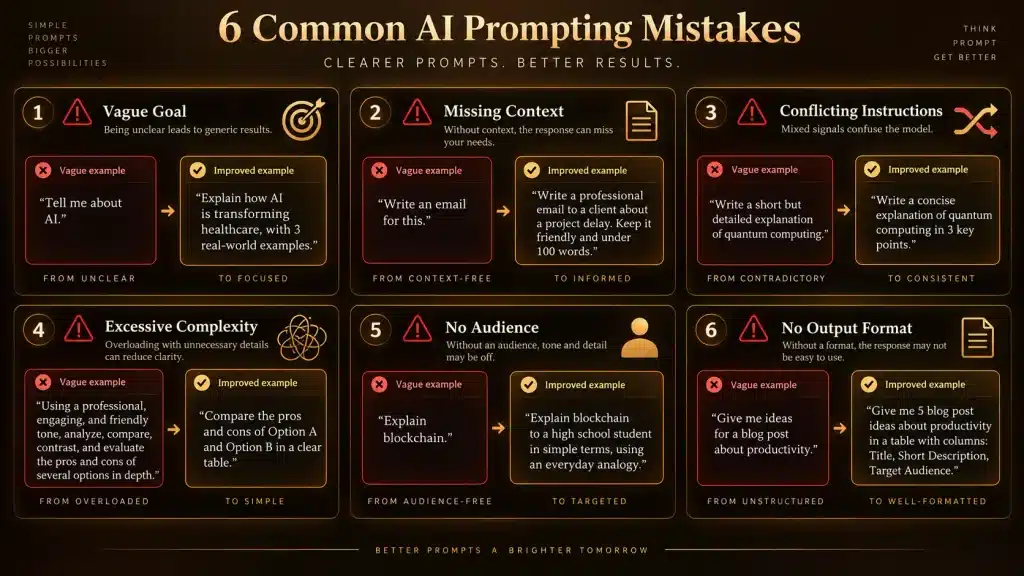
Many poor prompts fail for predictable reasons.
The most common problems are vagueness, missing context, conflicting instructions, unnecessary complexity, asking for unsupported current information, failing to define the audience, leaving the output format unspecified and treating the first response as final.
Consider this overloaded prompt:
Write an extremely detailed but short article that covers everything, uses simple language but is highly technical, has no lists but contains 20 bullet points, never makes assumptions but don't ask me any questions.Several requirements conflict.
A better prompt prioritizes:
Write a 1,200–1,500 word introductory article.

Audience:
Non-technical business owners.

Priority:
Clarity is more important than technical depth.

Cover the five concepts listed below.

If a detail cannot be determined from my information, flag it rather than guessing.
A shorter prompt with coherent requirements is usually stronger than a very long contradictory one.
Do “Magic Prompt Words” Work?
You may encounter social-media prompts containing expressions such as:
You MUST do this.I will tip you $500.This is extremely important for my career.You are the smartest AI in the universe.These are not a reliable substitute for clearly specifying the task.
OpenAI’s model guidance says it is generally unnecessary to rely on all-caps instructions, incentives or similar tricks as the default approach.
A useful prompt explains what success looks like.
It does not need theatrical persuasion.
Prompt Length: Is a Longer Prompt Better?
Not necessarily.
A prompt should contain the information required to complete the task.
Nothing more is automatically better.
For a simple task:
Rewrite this sentence in professional English without changing its meaning:
[TEXT]
is excellent.
You do not need a 500-word persona.
For a complex market analysis, however, several hundred words of context may be appropriate.
The useful question is:
Would removing this instruction make the task materially more ambiguous?
If not, it may not need to be there.
A Reusable Master AI Prompt Template
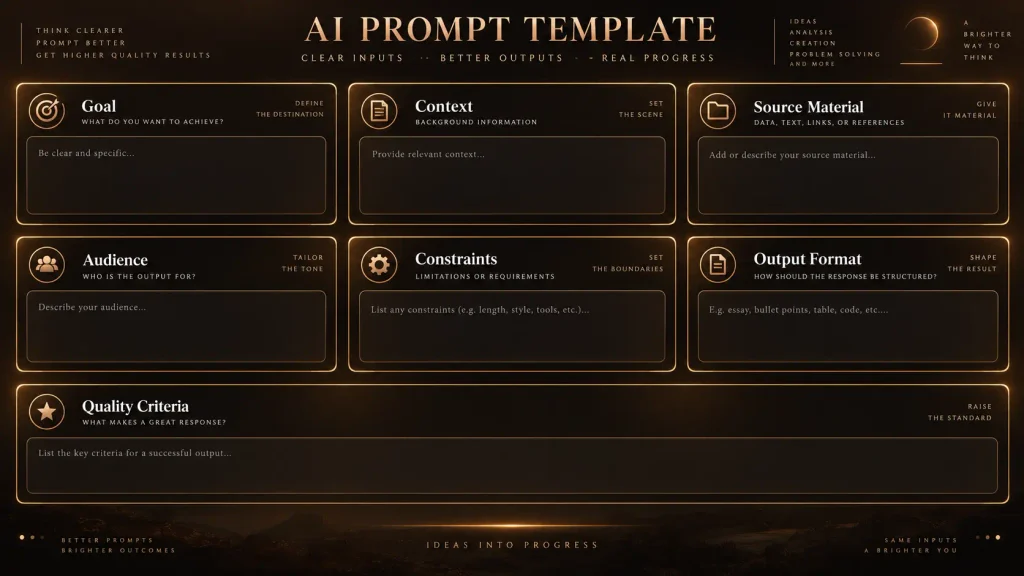
For complicated everyday work, this template is a good starting point:
# Goal
[What you want accomplished]

# Context
[Background the AI needs]

# Input
[Text, data, code, document or information to work from]

# Requirements
[Important things the answer must contain]

# Constraints
[Limits, things that must remain unchanged, evidence restrictions]

# Output
[Desired structure, tone, length or format]

# Quality Check
Before finalizing, verify that the answer satisfies every requirement above.
If required information is missing, identify the missing information rather than inventing it.
Do not blindly fill every section.
Remove anything your task does not need.
Example: Bad Prompt vs Good Prompt for Research
Weak prompt:
Tell me if coconut oil is healthy.Improved prompt:
Explain the current scientific evidence on coconut oil and cardiovascular health for a general reader.

Prioritize:
systematic reviews
major health organizations
peer-reviewed human research

Separate:
effects on LDL cholesterol
effects on HDL cholesterol
claims about weight loss
claims about general heart health

Compare coconut oil with commonly used unsaturated vegetable oils.

Do not treat a rise in HDL alone as proof of cardiovascular benefit.

Cite the primary or authoritative source behind important health claims.

Finish with a short practical summary while making clear that individual medical advice should come from a qualified healthcare professional.
The better prompt controls evidence quality and prevents simplistic conclusions.
Example: Bad Prompt vs Good Prompt for Coding
Weak prompt:
Fix this plugin.Improved prompt:
Debug this WordPress plugin.

Environment:
WordPress current version
PHP 8.3

Problem:
Activating the plugin produces the PHP fatal error pasted below.

Goal:
Find the root cause and make the smallest change that fixes the error.

Requirements:
Preserve existing functionality.
Do not rename public functions unless necessary.
Do not modify unrelated CSS or JavaScript.
Explain why the fatal error occurs.
Show exactly which file and code need changing.

Error:
[ERROR]

Relevant plugin files:
[FILES]
This gives the AI a measurable success condition.
Example: Bad Prompt vs Good Prompt for Marketing
Weak prompt:
Write an ad.Improved prompt:
Write three short Facebook ad concepts for an online accounting service aimed at Sri Lankan small businesses.

Goal:
Get business owners to request a free consultation.

Tone:
Professional and trustworthy, not aggressive.

Allowed claims:
[INSERT VERIFIED PRODUCT CLAIMS]

Do not:
invent customer numbers
invent testimonials
promise guaranteed financial results
use fake urgency

For each concept provide:
headline
primary text
CTA
The prompt actively prevents deceptive claims.
Example: Bad Prompt vs Good Prompt for AI Images
Weak prompt:
Generate a sports car.Improved prompt:
Photorealistic futuristic matte-black sports car parked alone on a clean mountain road at sunrise, entire vehicle fully visible from a low three-quarter front angle, realistic body proportions, premium automotive photography, subtle reflections on the paint, cinematic natural lighting, shallow atmospheric haze, 16:9 landscape, no people, no other vehicles, no text, no logos, no watermark.The second prompt defines the image rather than leaving the model to decide every visual element.
How to Evaluate Whether a Prompt Is Good
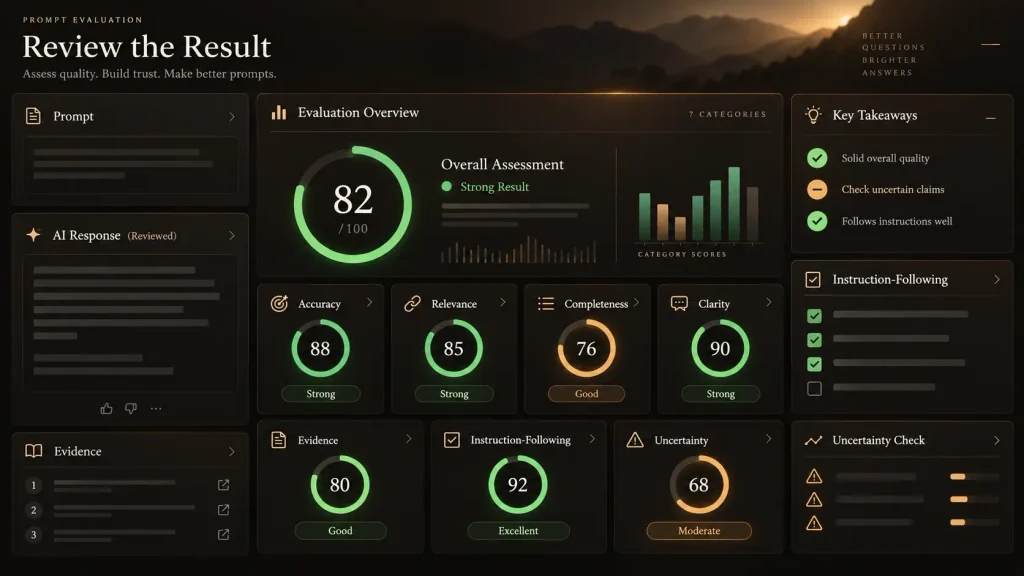
A prompt is not good because it is long.
It is good if it reliably produces the result you need.
For repeated workflows, test your prompt against multiple realistic cases.
Suppose you are building a customer-support classification prompt.
Do not test only obvious examples.
Test difficult cases:
a message that contains two problems, sarcastic language, incomplete information, misspellings, an unsupported request, a complaint that changes topic halfway through, and an edge case that fits no category.
For professional AI applications, formal evaluations are more reliable than adjusting prompts based on one or two successful examples. Anthropic’s prompting documentation explicitly connects prompt development with defining success criteria and evaluation, while Google describes prompt engineering as an iterative process that should be refined based on observed results.
AI Prompt Security: Be Careful With Sensitive Information
A well-written prompt can still create a privacy problem.
Avoid unnecessarily pasting:
passwords, OTPs, private API keys, banking credentials, confidential customer data, private medical information, undisclosed business secrets or other information you are not authorized to provide to the AI service.
The exact privacy handling depends on the platform, account type and settings.
For more detailed practical guidance, see our How to Use AI Chat Safely article.
Prompt Injection Is Different From Normal Prompt Writing
If you build AI applications, there is another issue to understand: prompt injection.
Prompt injection occurs when malicious or untrusted input attempts to change the intended behavior of an AI system.
This becomes especially important when an AI can:
access files, browse webpages, call APIs, send messages, update records or perform other actions.
OWASP’s current GenAI security work identifies prompt injection among the major security risks for LLM applications and notes that retrieval systems or fine-tuning alone do not completely eliminate the problem.
This means developers should not treat a clever system prompt as a complete security boundary.
Permissions, validation, data isolation, tool controls and safe application architecture also matter.
How to Prompt AI Agents
Prompting becomes more important when the AI can take actions instead of merely answering questions.
For an ordinary chatbot, a vague prompt may produce a bad answer.
For an agent, a vague prompt could produce a bad action.
Consider:
Clean up my files.That is risky.
A safer agent instruction is:
Review the files in this folder and identify obvious duplicate files.

Do not delete, move, rename or modify anything.

Return a proposed list of duplicates with the evidence used to identify them.

Wait for my approval before taking any file action.
The prompt defines:
the allowed action, prohibited actions, evidence requirement and approval boundary.
For agents with access to external systems, explicit authorization rules matter much more than decorative prompt wording.
How to Use Follow-Up Prompts Effectively
You do not have to restart every time the first response is imperfect.
Useful follow-ups include:
Make section 2 easier for a beginner to understand, but keep the technical terms and define each one.Your recommendation ignores my $500 budget. Re-evaluate the options using budget as a hard limit.The answer is too generic. Use the data I supplied and identify the three patterns unique to this dataset.Check every citation again. Remove any claim whose source does not actually support it.Keep the current structure but reduce repetition by about 20%.Iterative prompting is not a failure.
It is one of the core ways these systems are designed to be used.
Using Unlimited AI to Practice Better Prompts

You can practice these techniques directly using Unlimited AI Chat.
One useful exercise is to give the same prompt to different AI assistants and compare the results.
For example:
Explain how a VPN works to a beginner.

Use one simple analogy, but clearly explain where the analogy stops being accurate.

Keep the answer under 400 words.

Cover:
encryption
the VPN server
the user's ISP
IP address visibility

Finish with two common misconceptions about VPNs.
Then compare how the assistants handle:
accuracy, structure, completeness, uncertainty and readability.
Different models can respond differently even when given the same prompt, which is why there is no single prompt guaranteed to produce identical quality across every AI system.
If you are deciding which general AI assistant to use, see our Best AI Chatbot comparison.
Frequently Asked Questions About How to Write AI Prompts
What is the best way to write an AI prompt?
Start by clearly stating what you want the AI to accomplish. Add only the context it needs, define important constraints and specify the desired output. If factual information matters, define the evidence standard. Review the first response and refine your request when necessary. This aligns closely with current guidance from OpenAI, Anthropic and Google.
How do beginners write good AI prompts?
Write the prompt as if you were giving instructions to a capable person who does not already know your situation. Explain the task, necessary background and desired result.
For example:
Explain this electricity bill to someone who has never read one before.

Point out:
billing period
units consumed
rate
taxes
total amount
due date

If something is not visible in the bill, do not guess.
Do AI prompts need to be long?
No.
A simple task deserves a simple prompt.
Longer prompts are useful when the task has significant context, constraints, evidence or output requirements.
Do I need to use special prompt formulas?
No.
Prompt frameworks can help beginners remember important information, but there is no universal magic formula required for good results.
Clarity is more important than memorizing an acronym.
Is prompt engineering still useful with advanced AI?
Yes, but it is changing.
Newer models generally understand natural language and complex instructions better, which reduces the need for many older prompt tricks. The most useful modern prompting focuses increasingly on goals, context, success criteria, evidence and output requirements.
Should I tell AI to act like an expert?
It can help define the perspective, especially when you specify the actual expertise and task. However, saying “act as the world’s greatest expert” does not guarantee factual accuracy.
Should I ask AI to think step by step?
Not necessarily. Modern reasoning models often handle their reasoning internally. It is usually more useful to ask the model to check its answer, show necessary calculations, state assumptions and provide a concise explanation you can verify.
How can I stop AI from hallucinating?
You cannot guarantee that hallucinations will never occur simply by writing a prompt.
You can reduce risk by providing authoritative context, requiring source verification, allowing the model to say information is unavailable, using retrieval/search tools where appropriate and checking important claims yourself.
Can AI prompts include documents?
Yes, when the AI system supports file uploads. Clearly tell the system what information to extract or analyze and whether it should use only the document or can use external knowledge too.
Can I use the same prompt for ChatGPT, Claude and Gemini?
Usually you can start with the same core prompt, but results can differ. Each provider publishes model-specific prompting guidance, so important or repeated workflows should be tested and adjusted for the particular model.
What is few-shot prompting?
Few-shot prompting means providing several examples of the desired input-output behavior before asking the model to handle a new input. It is particularly useful for classification, formatting, style and repeated tasks.
How do I write an AI prompt for research?
Define the research question, scope, date range, acceptable evidence, preferred source types, required comparisons and what the model should do when evidence is contradictory or unavailable.
For serious research, also verify important claims against the original sources.
How do I write an AI prompt for images?
Describe the subject, environment, composition, lighting, style, aspect ratio and important visual constraints. Avoid depending entirely on vague words such as “beautiful” or “professional.”
Final Thoughts
Learning how to write AI prompts is less about discovering a secret command and more about becoming better at defining what you actually want.
A strong prompt answers the questions an AI would otherwise have to guess:
What is the goal?
What context matters?
What information should it use?
What constraints must it respect?
What should the result look like?
What happens if information is missing?
What evidence is required?
For simple tasks, that may take one sentence.
For complex research, coding or business work, it may require a structured prompt with source material and clear success criteria.
And the first prompt does not have to be perfect.
The most effective workflow is often:
clear first request → inspect the response → identify the problem → refine the instruction → verify the result
As AI models become more capable, the best prompt writers will not necessarily be the people who memorize the most complicated prompt templates.
They will be the people who can define a problem clearly, provide relevant evidence, recognize weak output and ask better follow-up questions.
Research and Editorial Transparency
This guide was developed using current official prompting documentation from OpenAI, Anthropic and Google, with AI security guidance from OWASP and search-quality guidance from Google Search Central.
OpenAI currently recommends clear, specific, goal-driven instructions and iterative refinement.
Anthropic recommends clear instructions, appropriate context, examples where useful and structured prompting for complicated inputs.
Google’s Gemini documentation recommends clear instructions, constraints, examples, context, structured prompts and iterative experimentation.
Google Search says AI-assisted content itself is not automatically a problem; using automation primarily to produce large volumes of low-value content for ranking manipulation can violate its spam policies. Google continues to emphasize helpful, reliable, original, people-first content.