
A laptop that sorts notes, a device that reads a photograph and an assistant that listens to a voice message have different needs. Choosing the largest model available is one approach. Choosing a compact model around a specific job is another—and that is the idea behind Liquid AI’s latest release.
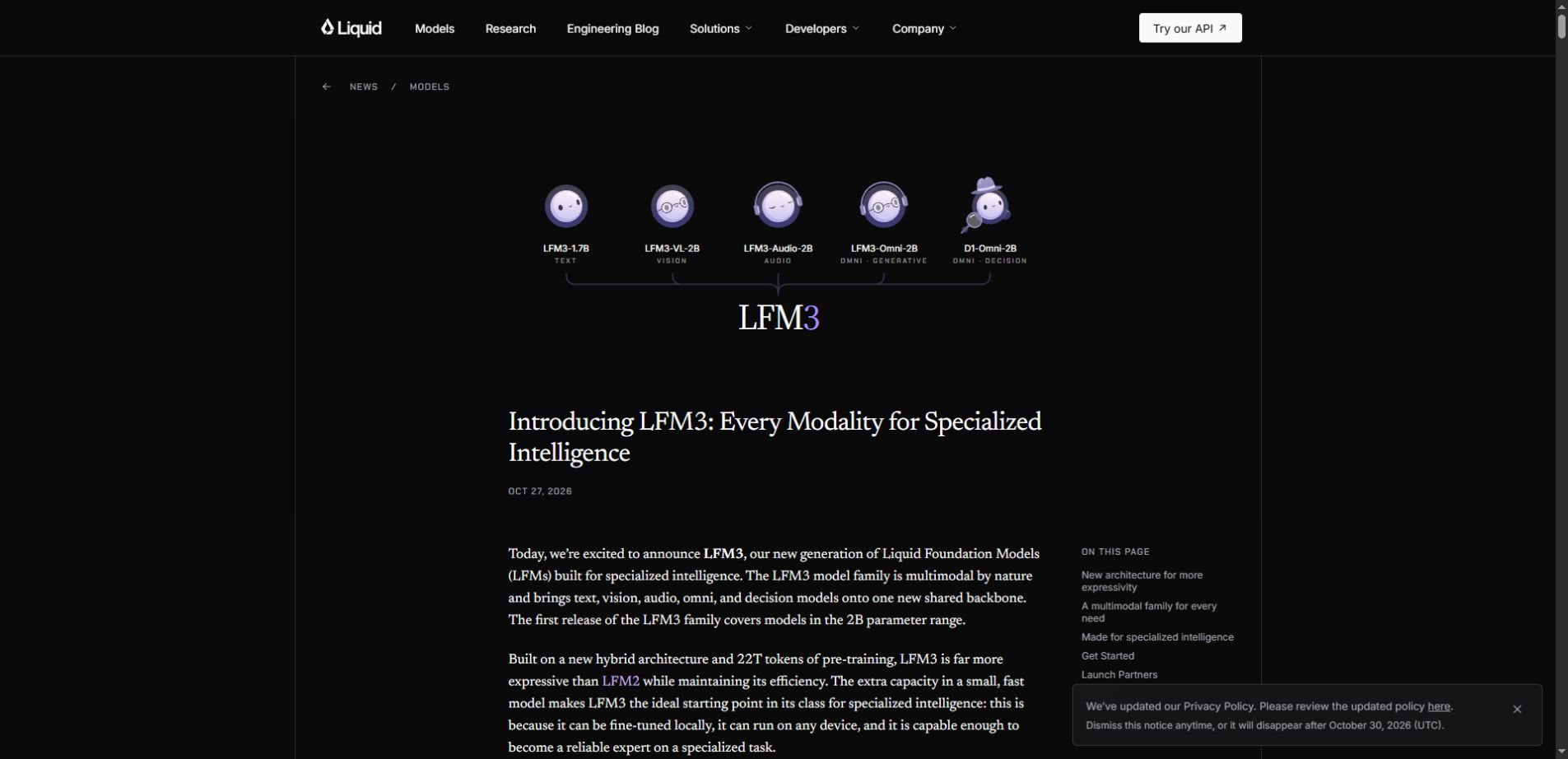
LFM3 is Liquid AI’s new family of Liquid Foundation Models, announced on October 27, 2026. The first release brings text, vision, audio, omni and decision variants into the roughly two-billion-parameter class, built from a shared backbone. The weights are available through the company’s official release announcement and linked repositories.
For a builder, the important question is not simply “How small is it?” It is “Which model receives the information my task needs, and can the complete application meet my quality and device requirements?” Here is a practical way to read the announcement without turning its headline specifications into deployment promises.
Choose the input before you choose the model
| Task input | LFM3 family branch to investigate | Illustrative application |
|---|---|---|
| Written text | LFM3-1.7B | Organize short notes into categories |
| Pictures and text | LFM3-VL-2B | Ask about a product photograph |
| Audio | LFM3-Audio-2B | Explore a voice interface |
| Several input modes | LFM3-Omni-2B | Combine a picture with spoken context |
| Defined decisions | d1-2B or d1-Omni-2B | Route an item to a review queue |
This table is a starting map, not a performance ranking. The examples are editorial scenarios, not applications we have tested with LFM3. Read the individual model card before assuming that one variant supports the same inputs, output behavior or deployment format as another.
The distinction saves unnecessary complexity. A text-only note organizer should not need a microphone just because the family includes audio. A photograph-based task needs actual visual information; asking a text model to guess what a missing picture contains is a design mistake.
Three projects, three different buying questions
The personal note organizer: can it follow your format?
Suppose you want a local app to turn short workshop notes into a consistent record: topic, action, owner and deadline. Start with a text model and define the output clearly. Keep a place for information that is absent rather than requiring every field to be filled.
Your first evaluation should include notes that contain no deadline, two possible owners or a correction halfway through. A model that produces tidy records while inventing missing details creates more work than a less polished assistant that asks for clarification.
For this project, success could mean that most records need only a quick review. It should not mean letting a generated deadline silently replace the original note. Keep the source beside the output so the person reviewing it can resolve disagreements quickly.
The product-photo helper: can it see what matters?
A second team wants help describing second-hand items from photographs. That calls for a vision-capable option. The evaluation changes: lighting, image resolution, tiny labels and partially hidden details now affect the result.
Separate visible observations from assumptions. “There is a scratch on the left edge” is different from “the device works perfectly.” A photograph may support the first statement while saying little about the second. The application should make that boundary obvious to its user.
Test ordinary pictures taken by the people who will use the tool, including difficult examples. A successful demo with a clean studio photograph does not establish how the app will handle glare, a cluttered counter or an unreadable serial-number sticker.
The voice-based intake tool: what happens when it mishears?
A third project accepts spoken maintenance requests. Audio support changes the interface, but the actual business problem remains capturing the correct issue and deciding what happens next. An ambiguous room number can matter more than a smoothly written summary.
Let the user confirm essential details before the request is submitted. Include background noise, different speaking styles and corrections in the evaluation. If a voice interface saves typing but creates frequent clarification calls, it may not improve the workflow overall.
What the LFM3-1.7B specifications actually tell you
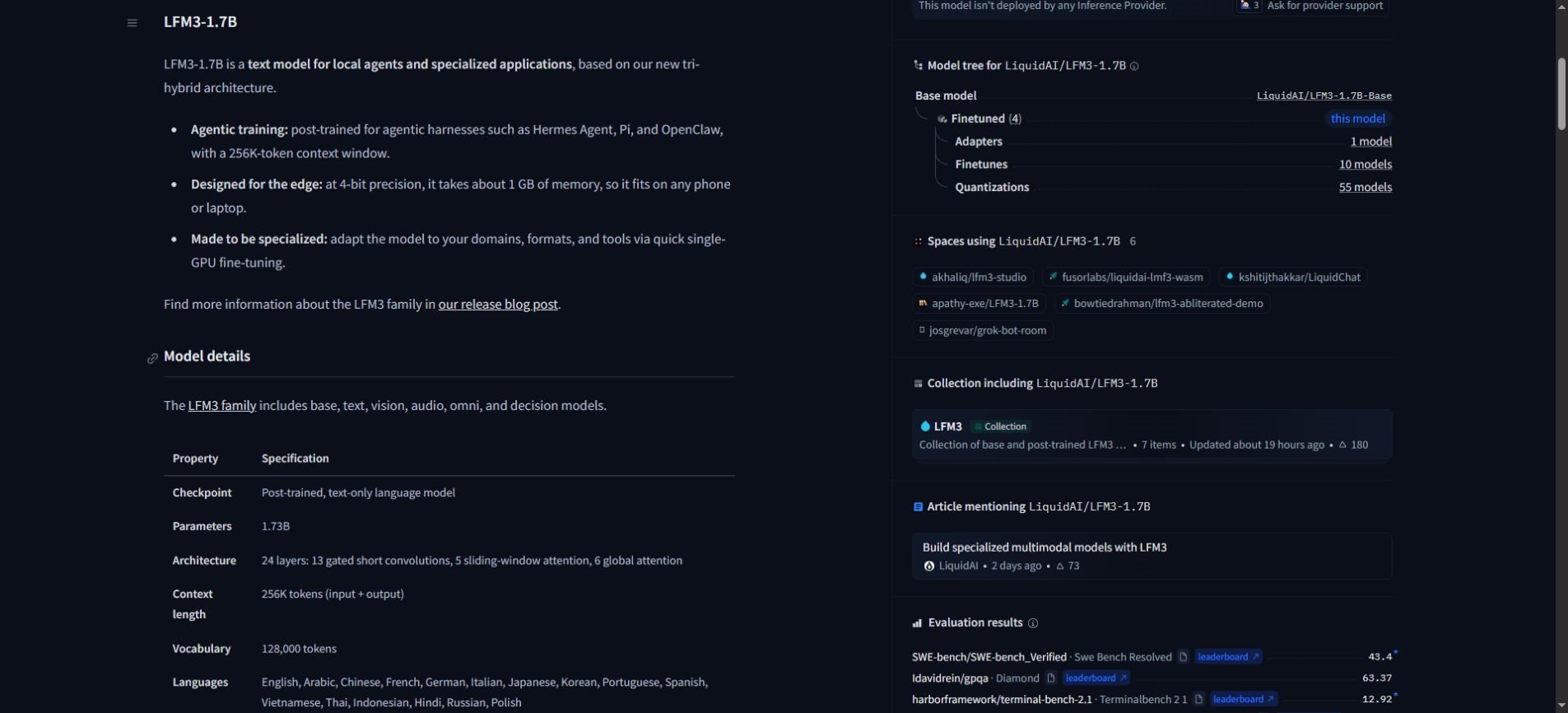
The official LFM3-1.7B model card lists 1.73 billion parameters and a 256K-token context length covering input and output. It describes a text-only checkpoint aimed at local agents, tool calling, structured outputs and domain-specific adaptation.
The same card recommends retrieval or search for knowledge-heavy work and does not recommend this small model for agentic coding or complex multi-step reasoning. That qualification matters when comparing a focused local assistant with a broad cloud service.
Read the number carefully: Liquid AI says the text model takes about 1 GB at 4-bit precision. That is not a guarantee that your complete app, long conversation, document processing and other running programs will fit into 1 GB. Measure the actual workload on the target device.
Quantization stores model values at reduced precision to lower their footprint. For an application team, the practical questions are whether the supported format runs in the intended software and whether the resulting quality is acceptable. A smaller download and a faster useful answer are related goals, but they are not the same measurement.
Likewise, a long context specification describes capacity. It does not establish that every important detail in a very long input will be used correctly or that the device will process it quickly. Test with the kinds and lengths of material the application will actually receive.
Local AI: follow the data, not just the model file
Running a model on a device can reduce the need to send its input to a hosted inference service. The rest of the application still matters. A local assistant might call web search, synchronize records, upload diagnostics or use a hosted speech component.
Draw a simple data map before calling a product “offline” or “private.” Identify where the original input, generated result, logs and backups go. Then test the behavior that matters: for example, whether a notes task continues to work when the network is unavailable.
A local model also needs maintenance. Decide who updates it, how a failed update is reversed and whether previous results remain reproducible. For a business, ownership of those operational tasks can matter as much as avoiding a per-request inference bill.
Our small AI guide explores the broader idea of choosing focused tools for concrete needs. LFM3 provides a current product example of that direction, rather than proof that every workflow should move on-device.
Use a scorecard that reflects the job
Instead of asking whether a model “beats” another in general, give both the same representative tasks. Define an acceptable answer before seeing the results. A useful scorecard should include the cost of fixing mistakes as well as the model’s response time.
- Correctness: did it return the right information, without inventing missing facts?
- Format: could the application use the result without repeated repairs?
- Responsiveness: how long until the user received a useful result?
- Device behavior: what happened to memory use, battery and other applications?
- Recovery: could the user correct or reverse an error easily?
- Total effort: did the task take less time after review and corrections?
Keep the same input set when comparing configurations. Record the model version, precision, software and device. Otherwise, a change in the document set or runtime can look like an improvement in the model itself.
The best result for a narrow task may be a compact model with clear boundaries. A difficult request may still need escalation, retrieval or a person. Our context engineering guide explains why the information provided to an assistant is part of the system you are evaluating.
Fine-tuning should solve a measured problem
Before adapting model weights, identify repeated failures that better instructions or cleaner input do not fix. Examples might include a specialized classification vocabulary or a consistent document format. Save a separate set of examples to assess whether the adaptation actually helps.
Do not judge the result only on the material used to teach it. Compare performance on unfamiliar examples and on ordinary tasks it previously handled well. An apparent improvement on one narrow format can come with regressions elsewhere.
For a first project, a reviewed prototype is often a more useful milestone than a fully autonomous agent. Keep consequential actions behind clear controls until the system’s behavior is understood. A small model should receive only the access its job requires.
LFM3 questions readers are asking
Is LFM3 one model?
It is a family with separate variants. Start with the input modes and output behavior your project requires, then review that variant’s documentation. The family name alone does not establish which capabilities a particular checkpoint has.
Can I download LFM3?
Liquid AI links the released weights in its official Hugging Face collection. Review the selected checkpoint, supported deployment format and license before using it. Downloadable weights do not mean every integration is already configured for your hardware.
Will a local model make AI free?
Local inference changes the cost structure. Hardware, energy, development, support and review still take resources. Compare the total cost of completing your task rather than only the price of an individual model call.
Where can I follow future updates?
Use the official announcement and model cards for technical changes. News AI is another place to follow wider AI coverage; confirm implementation decisions against the provider’s current documentation.
A useful next step: choose one bounded job
The LFM3 release makes an interesting case for smaller, specialized AI applications. Its practical value will depend on the match between a model, a task and the device running it.
Pick one repetitive job, define what a correct result looks like and compare a small prototype with the current process. If it saves effort after review, expand carefully. If it does not, the test has still answered the question that matters for your project.