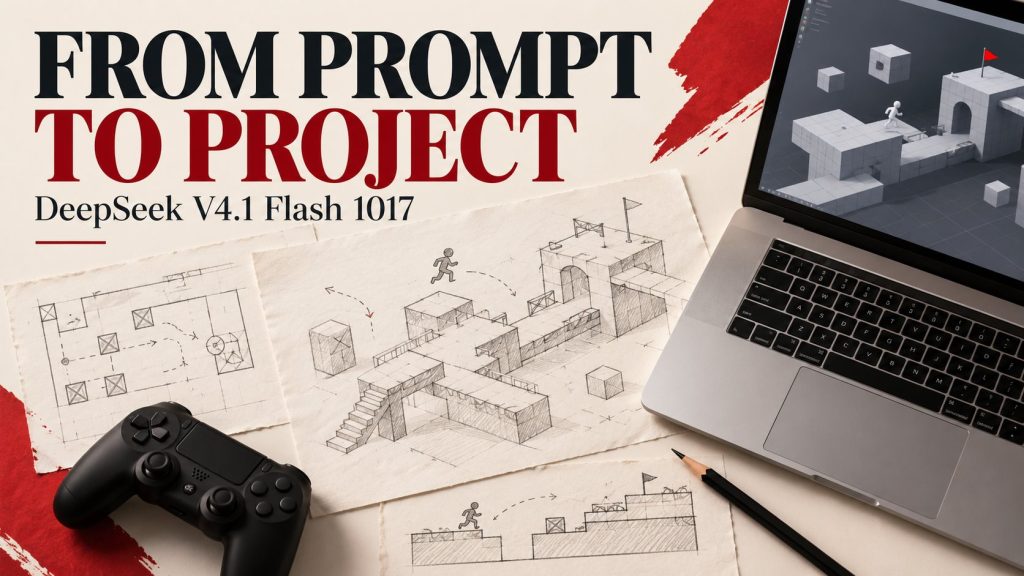
DeepSeek V4.1 Flash 1017 is an update focused on completing useful work: coding, reasoning and tasks that involve tools. DeepSeek released it on October 17, 2026, alongside wider access to its Search and Fetch APIs. Together, the announcements raise a practical question: can an AI workflow reach a correct result with less waiting and less unnecessary output?
This guide explains what DeepSeek announced, how web search differs from fetching a page, what the tool pricing covers and how to evaluate the update. It also separates a model’s capabilities from the coding environment that lets it inspect files, run checks and make changes.
Reviewed October 19, 2026. Release details and prices come from DeepSeek’s published documentation. Benchmark and efficiency claims are provider-reported; we have not independently tested this model. Check current availability and billing before using a paid service.
The release at a glance
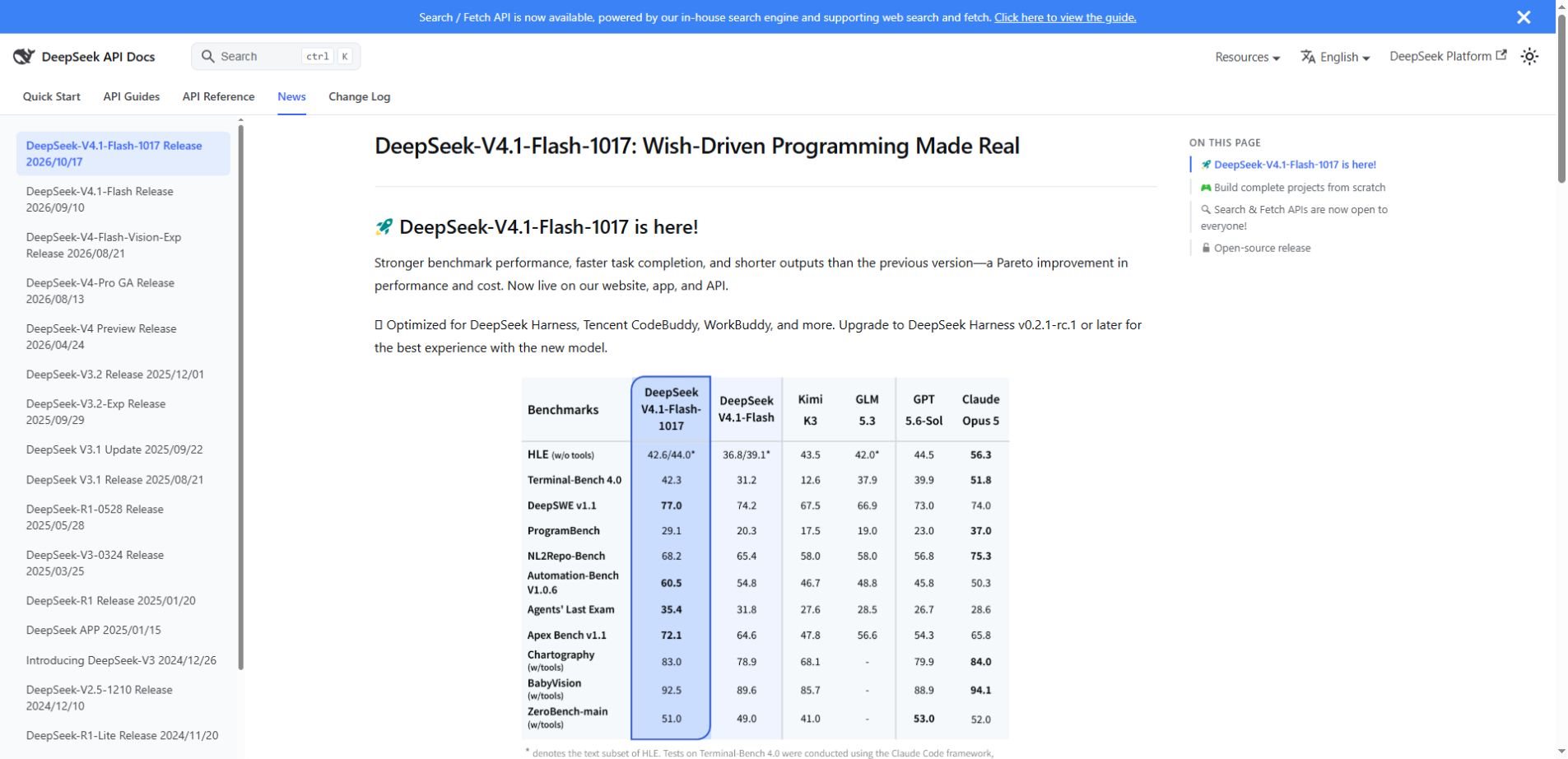
DeepSeek’s official announcement says V4.1 Flash 1017 is live on its website, app and API. It describes better benchmark performance, faster task completion and shorter outputs than the previous version. The accompanying model card calls it a minor update to V4.1 Flash, rather than a separate new model family.
The company highlights end-to-end project development and demonstrations involving games and 3D scenes. Those examples show the direction of the release. They do not establish that an arbitrary project will work correctly on its first attempt or without review.
The model card also provides downloadable weights and implementation guidance. This is useful for developers comparing hosted use with self-managed serving, but availability of weights does not establish the memory, speed or reliability of a particular local setup.
What “better project development” should mean for users
A complete coding task involves more than producing plausible code. The system needs to understand the request, inspect the relevant files, choose a change, run appropriate checks and respond to failures. A model update can improve parts of that process while the surrounding application determines which actions are possible.
For example, asking for a small browser game requires decisions about controls, state, collision behavior, restart logic and display size. The output is useful only if those parts work together. An impressive image of a game is different evidence from a playable result that survives basic testing.
DeepSeek describes using reinforcement learning with self-feedback to improve project development. Treat this as its account of the training approach. The practical evaluation remains whether the resulting system solves your tasks with acceptable quality, latency and review effort.
A model and a coding harness are different things
A coding harness is the software environment around the model. It may provide file access, terminal tools, browser inspection, test execution and a record of changes. The same model can behave differently when those tools, instructions or permissions change.
DeepSeek recommends DeepSeek Harness v0.2.1-rc.1 or later for the new release and names integrations including Tencent CodeBuddy and WorkBuddy. That compatibility information should not be read as a guarantee that every integration exposes identical features or uses the same configuration.
Our context engineering guide explains why the information surrounding a request matters. A clear task, relevant files and reliable feedback can be as important to the workflow as the model selected.
Search API versus Fetch API
The Search and Fetch guide describes two read-only services. Search finds relevant web results for a query. Fetch retrieves usable content from a specific page. They can be combined, but they solve different stages of a research task.
| Tool | Purpose | Practical example |
|---|---|---|
| Search | Find pages relevant to a query | Locate an official release announcement |
| Fetch | Retrieve content from a known URL | Read the announcement before summarizing it |
| Model inference | Generate or analyze a response | Explain the supported facts and remaining uncertainty |
A sensible workflow might search for a product update, select the original source, fetch its content and then ask the model to summarize only what that source supports. The result still needs checking: a search snippet may omit context, and a fetched page may be incomplete or unavailable.
Search results are evidence candidates, not automatic truth. Prefer original documentation for release details, inspect dates and distinguish a vendor’s claim from independent testing. If the tool cannot retrieve a page, the model should say so rather than fill the gap with a confident guess.
What Search and Fetch cost
As of this review, DeepSeek lists each endpoint at $0.75 per 1,000 successful requests. That is a tool-request price. It should not be confused with the token charges for generating a model response, or with a third-party application’s own charges.
The documentation says a billable Search request must return a non-empty results array, while Fetch must return page content. Failed requests, empty searches and timeouts are not billed. The number of results requested does not change the per-request Search price.
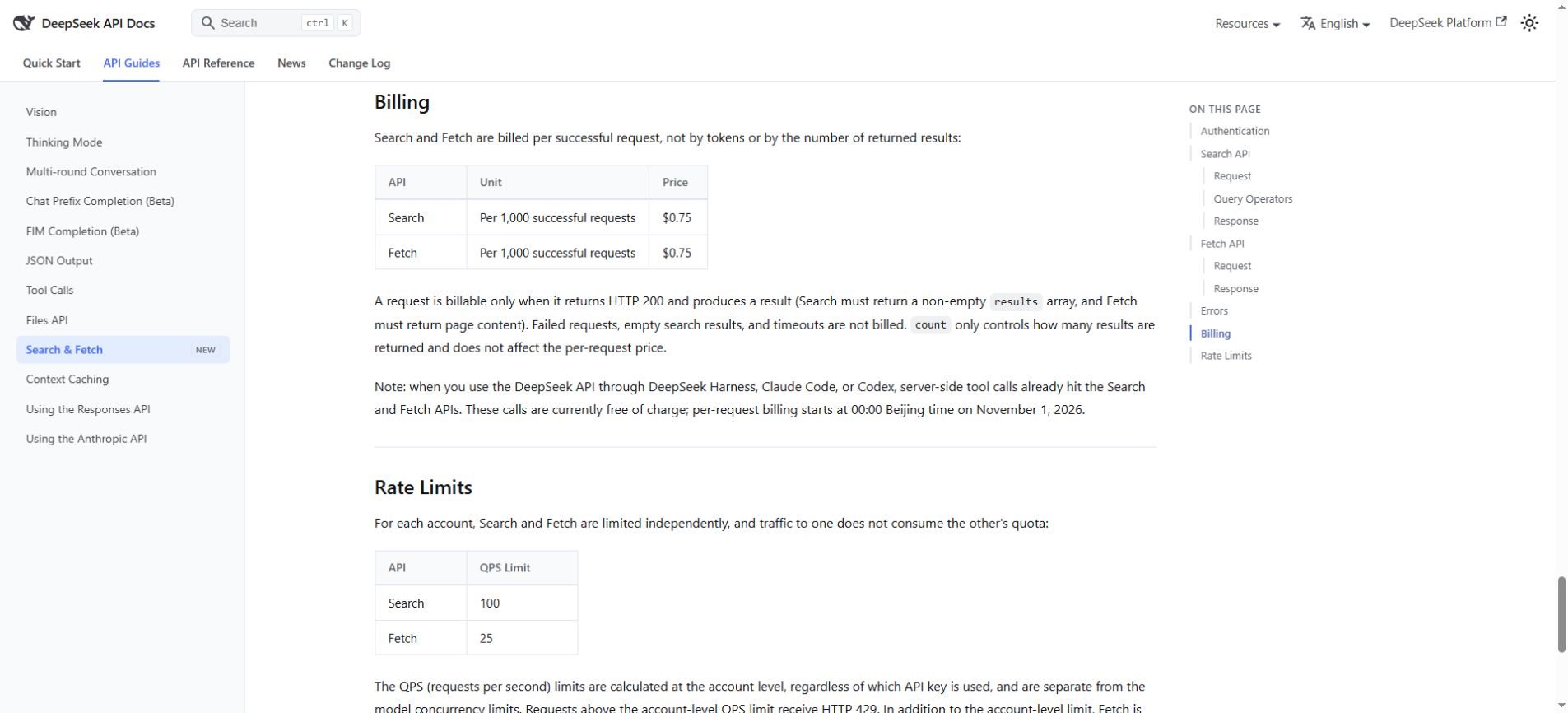
As a simple illustration, 1,000 successful Search requests plus 1,000 successful Fetch requests would total $1.50 in these endpoint charges at the listed rates. That calculation excludes model inference, any other services and any applicable billing arrangements. Count tool calls across the entire workflow rather than treating one user question as one request.
Temporary free period: DeepSeek says supported server-side Search and Fetch tool calls made through its API in specified coding environments are currently free. Billing for those calls starts October 31, 2026 at 16:00 UTC—November 1 at 00:00 Beijing time. This is not a statement that every direct API call or model response is free.
Keep the scope of that offer clear when comparing costs. Read the current guide for the environments and access route covered, and check again before expanding usage. A temporary promotion should not become the assumed long-term operating cost.
How to try the update without a complicated migration
For everyday users
Start with DeepSeek’s official interface and confirm which model or mode is available in your account. Use a small task whose result you can inspect, such as explaining a short piece of code or drafting a simple interactive page. Do not assume a model name shown by another website means the underlying release is identical.
For a factual question, ask for the original source and open it. For a coding answer, run the result in an isolated working copy. A concise response can be convenient, but it should still include the information needed to understand what changed and what was checked.
For developers using an API or coding tool
Read the current integration documentation rather than guessing a model identifier from the release title. Confirm the configured endpoint, supported features and tool permissions. Record those settings so a later comparison measures the intended update rather than a different environment.
Use a test project or branch before allowing an agent to change important work. Keep secrets and unrelated files outside the task’s scope. Begin with a limited change, inspect the result and expand only after the workflow behaves as expected.
For teams considering downloadable weights
The model repository provides prompt-encoding and inference references. It specifically notes that this release does not include a Jinja-format chat template, so generic serving assumptions deserve attention. Follow the maintained guidance for the checkpoint rather than copying a command intended for another model.
Self-managed use also requires capacity planning, monitoring and a way to update the runtime. Quantized or community-packaged versions may differ from the original release. Evaluate the exact artifact and configuration you intend to operate, not only its familiar name.
A useful first test: one change, clear checks
Choose a task with a known starting state. For example, improve a small page’s keyboard interaction while preserving its existing content. Define the expected behavior before asking the model, then inspect the change and test both the improved interaction and the original behavior.
Example task prompt
In this isolated project, fix the described keyboard interaction. First identify the relevant files and propose the smallest change. Preserve the existing content. After editing, run appropriate checks and report what passed, what failed and anything you could not verify.
This prompt is an evaluation aid, not a promise of safety or correctness. The surrounding tool still needs suitable permissions, and a person should review consequential changes. A final message saying “done” is weaker evidence than visible behavior and relevant checks.
- Record whether the task was actually completed.
- Track elapsed time, tool calls and retries.
- Measure review and correction effort.
- Note any unsupported claims about testing.
- Compare results under the same task and environment.
How to interpret the benchmark improvements
DeepSeek’s model card publishes gains over the prior Flash release across several evaluations. It also identifies different harnesses for particular coding tests. Those details matter because a benchmark score reflects the model, instructions, tools and evaluation setup together.
Avoid turning a few table entries into a claim that one model is best for every use. A system that performs well on repository changes may still need separate evaluation for multilingual writing, document extraction or a particular research workflow. Pick tasks that represent your actual work.
The claims of shorter outputs and faster completion are worth testing alongside correctness. Fewer tokens are helpful when they remove unnecessary repetition. They are less helpful if the response omits an important limitation, an unresolved failure or the evidence needed for review.
Our AI overreliance article explains why retaining your own criteria matters. Let the tool help produce the result, but keep a clear definition of what would count as success.
Frequently asked questions
When was DeepSeek V4.1 Flash 1017 released?
DeepSeek’s official news page lists October 17, 2026. This article was reviewed on October 19, 2026. It is an update within the V4.1 Flash line, not an announcement made today.
Is Search the same as Fetch?
No. Search finds results for a query; Fetch reads content from a selected URL. Neither automatically establishes that a page is correct, complete or current. The application still needs source selection and verification.
Is the update completely free?
Do not assume that. Consumer access, model inference, direct tool endpoints and temporary server-side tool offers have different terms. The published $0.75-per-1,000 rate applies separately to successful Search and Fetch requests; check current pricing for the route you use.
Does this article mean Unlimited AI already uses this version?
No. This is coverage of DeepSeek’s release, not an announcement of an Unlimited AI integration. A model’s availability through its provider does not establish which version another assistant platform serves.
What should you take away from the release?
DeepSeek V4.1 Flash 1017 is worth evaluating for coding and tool-assisted workflows, with particular attention to completion quality and total effort. Start with one checkable task, confirm the configuration and account for every component of the cost. Useful progress is a working result you can verify.
Primary sources: DeepSeek’s October 17 announcement, the official model card and the Search and Fetch documentation. These support the release and billing details; the suggested evaluation workflow is editorial guidance.