
Practical guide · 2026
An AI browser combines ordinary web browsing with an artificial intelligence assistant that can understand pages, compare information and sometimes complete multi-step actions. It can summarize tabs, fill forms, organize research and help users move from a question to a finished task.
The important change is agency. A normal browser waits for every click. An agentic browser can interpret a goal, plan several steps and interact with websites on the user’s behalf. That convenience also creates privacy, security and accuracy risks because the assistant may see sensitive page content or prepare actions with real consequences.
What is an AI browser?
An AI browser is a web browser with built-in or connected AI features. Basic versions can explain the page you are viewing, translate text, summarize several tabs or answer questions using visible content. More advanced versions can navigate pages, type into fields, compare options and prepare transactions.
The phrase agentic browser usually describes the more active version. Instead of only generating an answer, it can pursue a goal through a sequence of browser actions. For example, it may search several travel sites, compare dates and prices, then stop before booking so the user can review the result.
This overlaps with AI agents and AI search. The difference is where the work happens: an AI browser operates inside or alongside the browsing session and can use the current page as context.
How does an AI browser work?
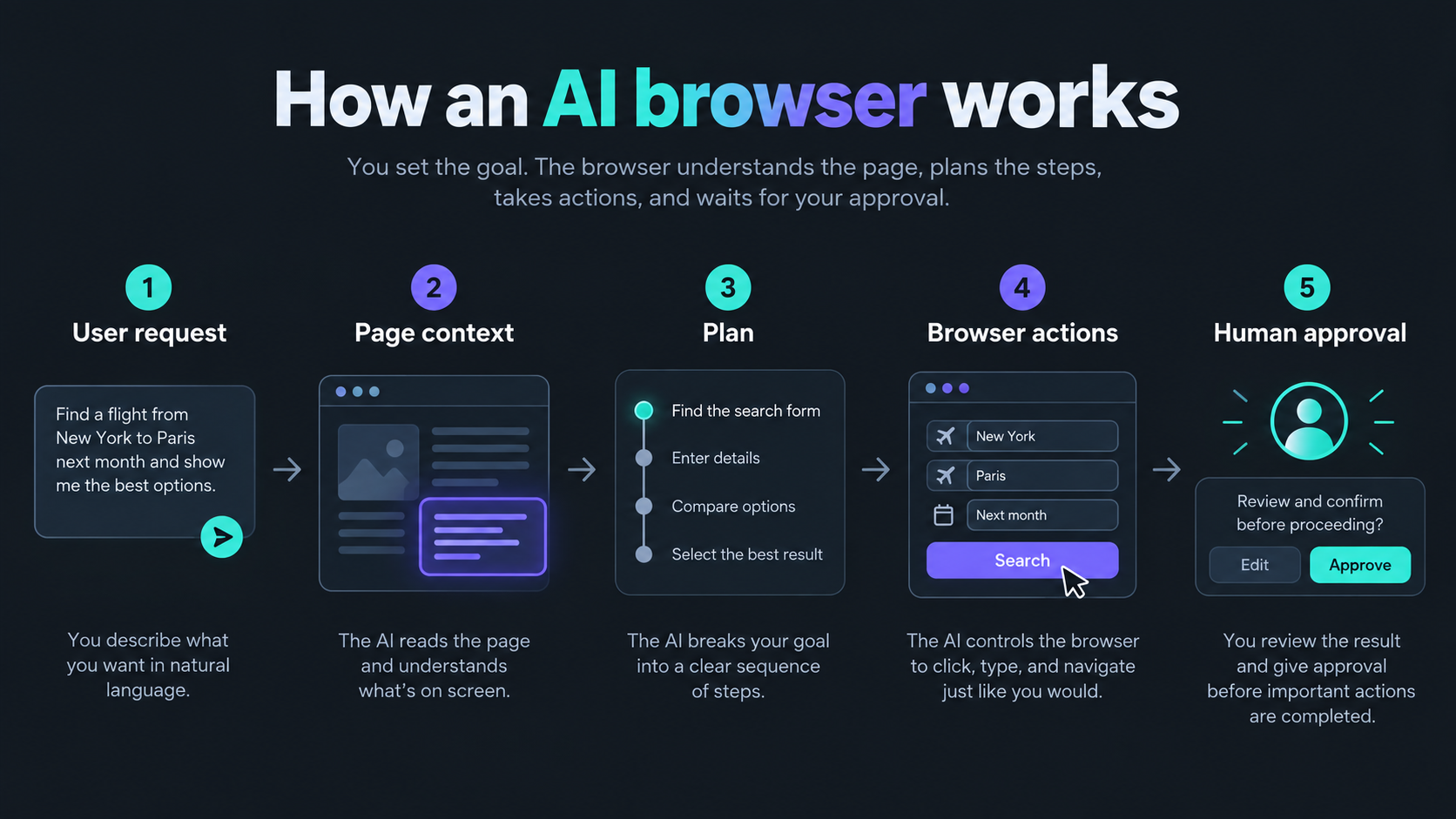
1. It understands the request
The user describes a goal in natural language. A clear request identifies the task, important limits and the point where the assistant must stop. “Compare three refundable hotels near the station and show me the options” is safer and more useful than “plan my trip.”
2. It reads permitted page context
The system may analyze text, links, forms, images or open tabs. Some processing occurs locally, while other systems send selected context to cloud models. Users should check what information leaves the device, how long it is retained and whether it may be used to improve models.
3. It creates a plan
The model breaks the goal into steps such as opening a search page, entering details, collecting results and comparing them. Good systems show progress and allow the user to interrupt, edit or cancel the plan.
4. It uses browser tools
The browser may click, type, scroll, open tabs or call structured website tools. Google has proposed WebMCP as a way for websites to expose clear functions to browser agents. Structured tools may reduce fragile screen-based automation, but websites and users still need permission and security controls.
5. It requests approval for important actions
A trustworthy system should pause before sending a message, publishing content, making a purchase, changing an account or sharing private information. The user needs a clear preview of the exact action, recipient, data and cost before approving it.
AI browser vs AI search vs chatbot
| Tool | Main role | Typical capability |
|---|---|---|
| AI browser | Assist inside the browsing session | Summarize tabs, understand pages and navigate websites |
| Agentic browser | Complete multi-step web tasks | Plan, click, type, compare and prepare actions |
| AI search | Find and synthesize information | Answer a question with web results and citations |
| Chatbot | Hold a conversation | Explain, draft, brainstorm or analyze supplied information |
The categories increasingly overlap. A browser may include search and chat, while a chatbot may use a remote browser. The practical question is not the label but the permissions: what can the system see, what actions can it take and when does it require confirmation?
Why AI browsers are trending in 2026
Major browser companies are moving AI from a separate chat window into the browsing experience. Google announced Gemini in Chrome with auto browse for Android, while Microsoft introduced agentic browsing in Edge for Business in limited preview. Opera expanded its Neon agentic browser, and Samsung added agentic AI features to its Windows browser.
Google also reported that AI Mode queries related to planning grew faster than AI Mode queries overall. That supports a broader shift from asking for information toward asking an AI system to help organize or complete a task.
Read the official announcements from Google Chrome, Microsoft Edge and Opera for current availability and limitations.
Useful AI browser tasks
Research across tabs
An AI browser can summarize several pages, extract common themes and build a comparison table. Users should open and verify the original sources because summaries can omit conditions, confuse dates or combine incompatible evidence. Our RAG guide explains why source-grounded answers still need review.
Shopping and travel planning
The assistant can compare products, hotels, routes or schedules using stated limits. Prices and availability change quickly, so it should show the source, timestamp, taxes, cancellation terms and final total. The user should complete the purchase personally after reviewing every detail.
Forms and routine administration
An agent can prepare repetitive form fields using information the user approves. This can improve accessibility and save time, but high-stakes forms involving health, employment, finance, law or government services require careful human review.
Writing and content workflows
A browser assistant can collect reference pages, outline an article and draft text. It should preserve source links and distinguish facts from suggestions. You can use Unlimited AI to compare model responses, refine the draft and create supporting media after verifying the research.
Accessibility support
AI can explain complex layouts, summarize long pages, translate text or help people navigate with natural-language commands. Products should still provide keyboard access, captions, clear focus indicators and conventional controls when AI fails.
Benefits of an AI browser
- Less repetitive work: it can handle routine navigation and data collection.
- Better context: it can reason about the page or tabs already open.
- Natural-language control: users can describe a goal instead of finding every menu.
- Faster comparison: it can organize information from several pages.
- Accessibility: it can reduce the effort needed to understand or navigate complex sites.
- Continuity: some systems can help across desktop and mobile sessions.
These benefits depend on reliable context, good permission design and human supervision. An incorrect chatbot answer is inconvenient; an incorrect browser action can change an account, expose data or cost money.
AI browser risks and limitations

- Privacy exposure: page content may include messages, documents, account details or personal data.
- Prompt injection: a webpage may contain hidden or misleading instructions designed to redirect the agent.
- Wrong actions: the system may misunderstand a goal, button or form field.
- Hallucinations: summaries and comparisons can contain invented or outdated details.
- Account compromise: broad browser access can increase the impact of a malicious extension or stolen session.
- Bias and ranking: the assistant may favor certain sources, products or providers.
- Reduced visibility: automation can hide important terms that a user would notice during manual browsing.
Research on agentic browsers has highlighted possible cross-origin data-flow risks, while browser vendors are developing stronger isolation, enterprise controls and structured website tools. These protections help, but they do not remove the need for least-privilege access and confirmation.
For common accuracy failures, see our AI hallucinations guide.
How to use an AI browser safely
- Start with low-risk tasks such as summarizing public pages.
- Give access only to the tabs, sites and data required for the task.
- Keep banking, password management, health records and private work accounts outside the agentic session.
- Use a separate browser profile for experiments when possible.
- Ask the assistant to show its plan before taking action.
- Require approval before messages, uploads, purchases, submissions or account changes.
- Check the destination, recipient, final text, price and terms yourself.
- Verify factual claims against the original page and publication date.
- Review microphone, camera, location, clipboard and download permissions.
- Clear sensitive sessions and revoke permissions when the task ends.
“Compare the public information on these pages. Do not sign in, upload files, send messages, submit forms, make purchases or change any account. Show your sources, list uncertain details and wait for my approval before any action.”
How to choose an AI browser
Choose based on control and transparency rather than the length of the feature list. Look for clear permission prompts, per-site access, an action history, easy interruption, local-processing options and explicit confirmation before consequential steps.
Check whether browsing data is used for model training, how long it is retained, whether private mode disables AI processing and whether administrators can manage features. Business users should also review data-loss-prevention, audit and identity controls.
AI browser FAQ
Is an AI browser the same as an AI search engine?
No. AI search mainly finds and summarizes information. An AI browser can understand the browsing session and may interact with websites. Many products include both capabilities.
Can an AI browser buy things for me?
Some systems can prepare or complete shopping tasks. Keep final purchase approval under your control and verify the product, seller, quantity, delivery address, subscription terms and total price.
Are AI browsers safe?
They can be useful when permissions are narrow and actions are supervised. Risks increase when the browser can access private accounts, stored sessions or sensitive pages. Use least-privilege access and review every important action.
Can an AI browser see my passwords?
Capabilities differ. Password managers may hide stored passwords, but an agent working in an authenticated session can still interact with account pages. Review documentation and avoid granting agent access to sensitive accounts.
Will AI browsers replace normal browsers?
AI features are likely to become a common browser layer, but users still need conventional navigation, direct source access and manual controls. The safest products let people choose when AI is active.
Final takeaway
AI browsers can reduce repetitive work and make the web easier to use. Agentic browsing also gives software more access to pages, accounts and actions. Begin with public, reversible tasks; restrict permissions; verify sources; and require clear human approval before anything is sent, submitted, purchased or changed.